Issue a credential
Issuing a credential means creating a digital credential, such as a certificate or a membership card, and sending it to someone's wallet. In Hovi Studio it takes a few clicks.
Before you start
Make sure you have:
- A Hovi Studio account with your organization and ecosystem set up.
- A credential template for the credential you want to issue.
- For cheqd, Indicio and Polygon only: a connection with the person you're issuing to.
Steps
Choose your ecosystem. Hovi remembers your choice on other pages.
 EU Digital Identity
 Microsoft Entra
 cheqd
 Indicio
 Polygon
EU Digital IdentityThe person scans a QR code or opens a link with Hovi Wallet. You choose whether they also need a PIN:
- Without a PIN: the person scans the code and accepts the credential.
- With a PIN: the person also types a one-time transaction code before accepting, for extra security. Tick Pre-Authorized Code Flow with PIN to use it.
-
Sign in to Hovi Studio.
-
In the left menu, open Credential Workflow and click Issue Credentials. Then click Issue credential.

-
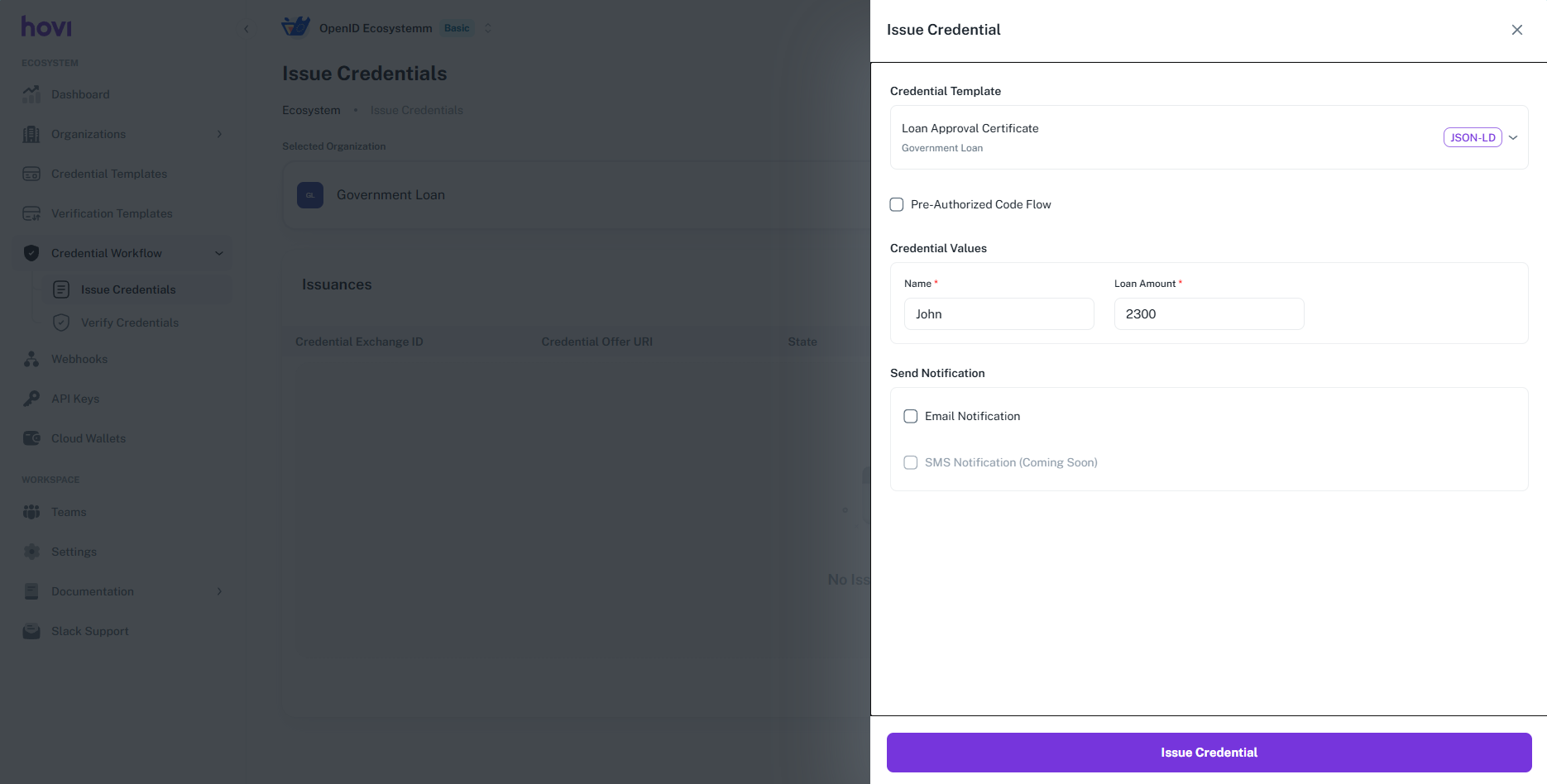
Choose a template and fill in the credential details. To add a PIN, tick Pre-Authorized Code Flow with PIN.
-
Optional: tick Email Notification and enter the person's email address to send them the offer by email.
-
Click Issue Credential.
-
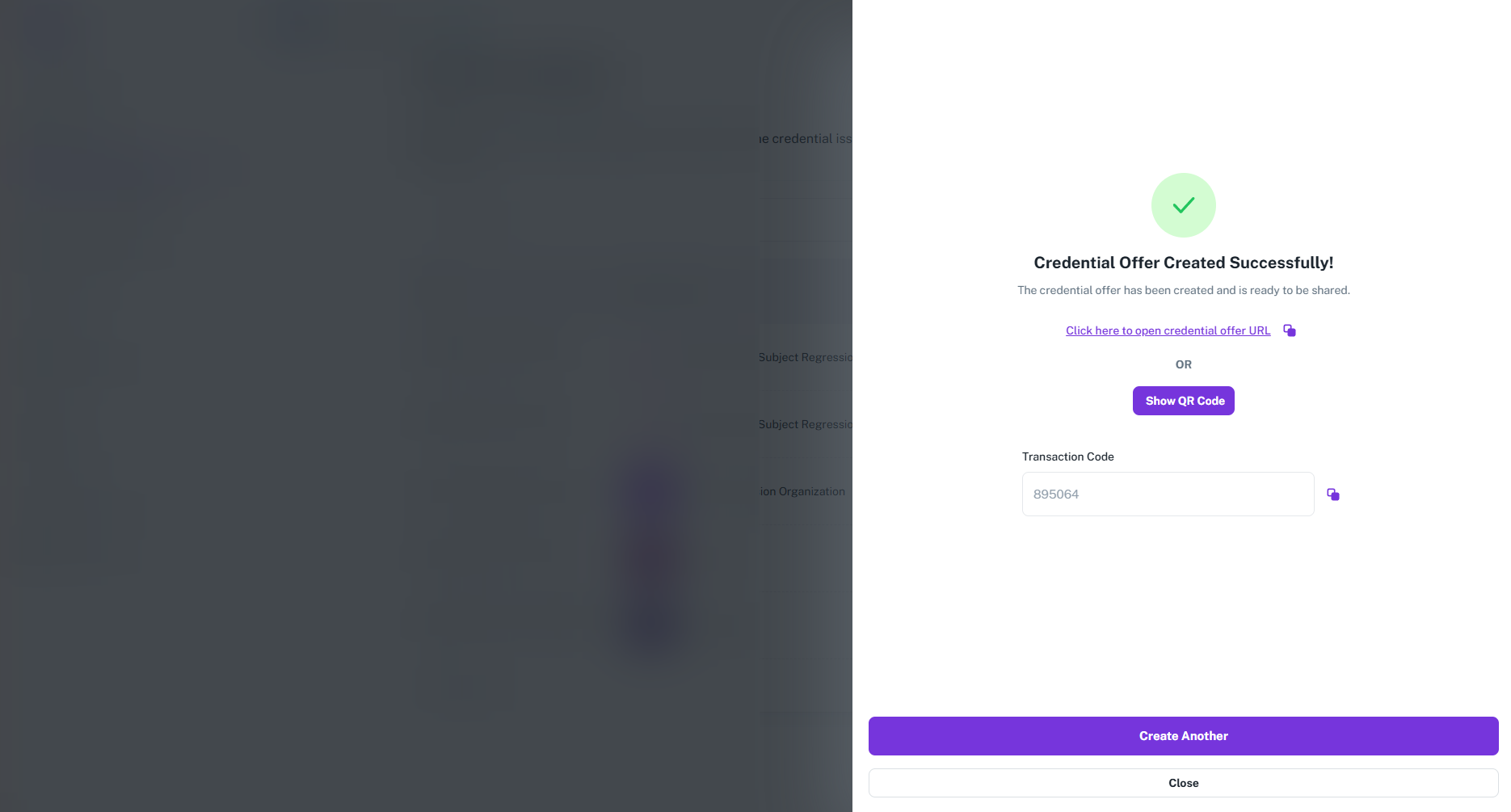
Share the offer: click Show QR Code for the person to scan, or copy the credential offer link and send it to them. If you added a PIN, the transaction code is shown here too: give it to the person.

With a PIN, the Transaction Code appears below the offer. Copy it and give it to the person.
Microsoft EntraThe person scans a QR code or opens a link with Microsoft Authenticator. You choose whether they also need a PIN:
- Without a PIN: the person scans the code and accepts the credential.
- With a PIN: the person also types a one-time transaction code before accepting, for extra security. Tick Pre-Authorized Code Flow with PIN to use it.
- Sign in to Hovi Studio.
- In the left menu, open Credential Workflow and click Issue Credentials. Then click Issue credential.

- Choose a template and fill in the credential details. To add a PIN, tick Pre-Authorized Code Flow with PIN.

- Optional: tick Email Notification and enter the person's email address to send them the offer by email.
- Click Issue Credential.
- Share the offer: click Show QR Code for the person to scan, or copy the credential offer link and send it to them. If you added a PIN, the transaction code is shown here too: give it to the person.

cheqdYou issue the credential over your connection with the person, so it goes straight to their wallet.
- Sign in to Hovi Studio.
- In the left menu, open Credential Workflow and click Connections.

- On the person's connection, click the issue credential button.

- Choose the template and the connection, fill in the credential details and click Issue Credential.

- The credential is sent to the person's wallet shortly.

IndicioYou issue the credential over your connection with the person, so it goes straight to their wallet.
- Sign in to Hovi Studio.
- In the left menu, open Credential Workflow and click Connections.

- On the person's connection, click the issue credential button.

- Choose the template and the connection, fill in the credential details and click Issue Credential.

- The credential is sent to the person's wallet shortly.

PolygonYou issue the credential over your connection with the person. Once you are connected, the credential offer alone is enough: the person scans it in the Privado ID wallet.
- Sign in to Hovi Studio.
- In the left menu, open Credential Workflow and click Connections.

- On the person's connection, click the issue credential button.

- Choose the template and the connection, fill in the credential details and click Issue Credential.

- Click Show QR Code. The person scans it with their wallet, and the credential is added shortly.

Sending a credential to someone who isn't with you
For EU Digital Identity and Microsoft Entra, tick Email Notification in the issue form. Hovi emails the person a link to accept the credential and, if you added a PIN, the transaction code. You can also copy the credential offer link and send it yourself.
Hovi Studio issues one credential at a time. To issue to many people automatically, a developer can use the API.
What happens next
The person now has the credential in their wallet and can share it whenever someone needs to check it. To check credentials that people share with you, see Verify a credential.